View Actions
This document provides detailed guidance on configuring actions in views. Actions enable users to perform operations (like creating, editing, or triggering workflows) directly from the view interface.
Actions vs Header Actions
There are two distinct action contexts in views:
- Root-level
actions: Custom actions available for the entire view, typically used in form views. Examples include "Validate Booking," "Check In," etc. header.actions: Predefined actions that control standard buttons (Create, Save, Cancel, etc.). These are used to customize which buttons appear and their behavior, particularly in list views.
Do not confuse these two configurations—they serve different purposes and appear in different view contexts.
Root-Level Actions
Custom actions defined at the root level allow users to perform domain-specific operations. Each action is typically represented as a button in the view.
Behavior
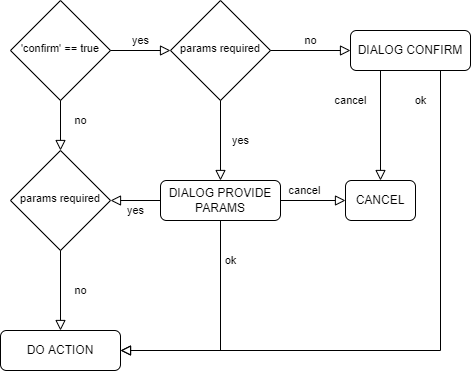
When an action is triggered:
- If the action's controller requires parameters, a dialog prompts the user to provide values
- If
confirmistrue(and no parameters are required), a confirmation dialog appears - Upon user confirmation, the controller is invoked
- The view is automatically refreshed after successful completion
See the action flow diagram for a visual representation of this interaction.
Actions in Forms
When several actions are defined in a form view, they appear in a dropdown menu. In contrast, in list views, actions are displayed as individual buttons in the header.
Configuration
Structure:
| PROPERTY | TYPE | DESCRIPTION |
|---|---|---|
id |
string |
Identifier for translation and reference purposes |
label |
string |
Button label displayed to the user |
description |
string |
Description shown on hover, explaining what the action does |
controller |
string |
ORM/Entity controller invoked when the action is triggered. The current object's id is sent as a parameter by default |
visible |
array |
(optional) Domain conditions to determine if the action button is shown (Example: "visible": ["status", "=", "active"]) |
confirm |
boolean |
(optional) If true, displays a confirmation dialog before execution |
params |
object | (optional) Associative array mapping field names to values. Values can reference user properties (user.login) or object properties (object.id) |
access |
Access | (optional) Access control to restrict visibility and invocation |
Example: Booking State Machine
This example demonstrates a multi-step booking workflow with interdependent actions:
{
  "actions": [
    {
      "id": "action.option",
      "label": "Set as Option",
      "description": "Block rental units without claiming funding.",
      "controller": "lodging_booking_option",
      "visible": ["status", "=", "quote"],
      "confirm": true,
      "params": {
        "id": "object.id"
      }
    },
    {
      "id": "action.validate",
      "label": "Confirm Booking",
      "description": "Block units and set up the invoicing plan.",
      "controller": "lodging_booking_confirm",
      "visible": ["status", "in", ["quote", "option"]]
    },
    {
      "id": "action.checkin",
      "label": "Check In",
      "description": "Mark the rental units as occupied.",
      "controller": "lodging_booking_checkin",
      "visible": ["status", "=", "validated"]
    },
    {
      "id": "action.checkout",
      "label": "Check Out",
      "description": "Mark the rental units for cleaning.",
      "controller": "lodging_booking_checkout",
      "visible": ["status", "=", "checkedin"]
    },
    {
      "id": "action.invoice",
      "label": "Invoice",
      "description": "Emit the invoice after checkout and room review.",
      "controller": "lodging_booking_invoice",
      "visible": ["status", "=", "checkedout"]
    }
  ]
}
Each action's visible condition limits its appearance to appropriate workflow stages, preventing invalid state transitions.
Header Actions
Header actions customize the standard buttons available in a view's header. These are used to enable, disable, or override the default behavior of predefined actions like Create, Save, and Cancel.
Predefined Actions
The following predefined action IDs are supported. Each corresponds to a button type available in the view header:
| ACTION | DESCRIPTION | ID |
|---|---|---|
ACTION.EDIT |
For forms in view mode, allows to edit the current object | EDIT, EDIT_BULK, EDIT_INLINE |
ACTION.SAVE |
For forms in edit mode, ACTION.SAVE is the action used for storing the changes made to the current object | SAVE_AND_CLOSE, SAVE_AND_VIEW, SAVE_AND_CONTINUE |
ACTION.CREATE |
For list views, ACTION.CREATE is the action used for creating a new object of the current entity. | CREATE, ADD |
ACTION.CANCEL |
For forms in edit mode, allows to cancel the current operation and return to view mode. | CANCEL_AND_CLOSE, CANCEL_AND_VIEW |
ACTION.SELECT |
For relational fields, allows to select or add one or many objects and relay selection to parent View | SELECT |
ACTION.OPEN |
For relational fields, allows to open the related object in a new context | OPEN |
ACTION.CLONE |
For forms in view mode, allows to clone the current object and open the clone in edit mode. | CLONE |
ACTION.ARCHIVE |
For list views, allows to archive the current object and hide it from active lists. | ARCHIVE |
ACTION.DELETE |
For list views, allows to delete the current object. | DELETE |
Edit Action Variants
The ACTION.EDIT action supports multiple variants controlling how the edit mode is triggered:
| VARIANT | BEHAVIOR |
|---|---|
EDIT |
Open the form in edit mode, replacing the current view |
EDIT_BULK |
Open a bulk edit context to edit multiple selected items |
EDIT_INLINE |
Enable inline editing directly in the list without opening a form |
Save Action Variants
The ACTION.SAVE action supports multiple variants controlling post-save behavior:
| VARIANT | BEHAVIOR |
|---|---|
SAVE_AND_CLOSE |
Save the form and return to the previous context |
SAVE_AND_VIEW |
Save the form and open the view-only version (usually the parent) |
SAVE_AND_CONTINUE |
Save the form and keep it open, showing a snackbar confirmation |
SAVE_AND_EDIT |
Save and open a cloned context in edit mode |
Create Action Variants
The ACTION.CREATE action supports multiple variants:
| VARIANT | BEHAVIOR | CONTROLLER |
|---|---|---|
CREATE |
Open a form to create a new object | model_create |
ADD |
Open a context to add objects to a many-to-many list | model_update |
CREATE_INLINE |
Add a new row at the top of the list without opening a form | — |
Cancel Action Variants
The ACTION.CANCEL action supports these variants:
| VARIANT | BEHAVIOR |
|---|---|
CANCEL_AND_CLOSE |
Discard changes and return to the previous context |
CANCEL_AND_VIEW |
Discard changes and switch to view-only mode |
Configuration
Structure:
| PROPERTY | TYPE | DESCRIPTION |
|---|---|---|
id |
string |
Predefined action identifier (required for variants) |
description |
string |
(optional) Custom description overriding the default |
domain |
array |
(optional) Domain conditions for action (Example: "visibility": ["admin"]) |
view |
string |
(optional) ID of the view to display when the action requires a view |
controller |
string |
(optional) Custom ORM/Entity controller to override default behavior |
Configuration Rules
- Show/hide actions: Set a predefined action ID to
falseto hide it - Multiple variants: Use an array of action items to display split-buttons (the order is preserved)
- Custom controller: Optionally override the default controller for standard actions
- Custom description: Provide a
descriptionproperty to override the default button label - Empty arrays: An empty array or
falsemeans the action is unavailable
Examples
Basic configuration with hidden actions:
{
  "header": {
    "actions": {
      "ACTION.EDIT": true,
      "ACTION.SAVE": true,
      "ACTION.SELECT": false,
      "ACTION.DELETE": false
    }
  }
}
Split-button with multiple save variants:
{
  "header": {
    "actions": {
      "ACTION.SAVE": [
        {"id": "SAVE_AND_CONTINUE"},
        {"id": "SAVE_AND_CLOSE"},
        {"id": "SAVE_AND_VIEW"}
      ]
    }
  }
}
Custom controller for create action:
{
  "header": {
    "actions": {
      "ACTION.CREATE": [
        {
          "view": "form.create",
          "description": "Create a new booking.",
          "domain": ["parent_status", "=", "object.status"],
          "access": {
            "groups": ["admin", "manager"]
          },
          "controller": "lodging_booking_create"
        }
      ]
    }
  }
}
Inline layout with CREATE_INLINE only:
{
  "header": {
    "layout": "inline",
    "actions": {
      "ACTION.CREATE_INLINE": true
    }
  }
}
Default Action IDs for Common Views
Default actions vary by view type:
- Forms:
ACTION.EDIT,ACTION.SAVE,ACTION.CREATE,ACTION.CANCEL - Lists:
ACTION.CREATE,ACTION.CREATE_INLINE,ACTION.SELECT,ACTION.OPEN
These defaults can be customized or hidden using the header.actions configuration.
Action Access Control
Both root-level actions and header actions support an access property to control visibility and invocation permissions.
Structure:
| PROPERTY | DESCRIPTION |
|---|---|
groups |
Array of group names whose members can see/use the action |
Note: The access property controls UI visibility. Actual permission checks for controller invocation must be configured in the controller itself.
Example:
{
  "id": "action.admin_only",
  "label": "Admin Action",
  "controller": "some_controller",
  "access": {
    "groups": ["admin"]
  }
}