Data Import
The eQual framework provides a flexible and robust way to import data into entities using mappings and transformers. This guide explains the key concepts, tools, and processes involved in importing data.
Entity Mapping
An EntityMapping is associated with an entity and defines how to import data from a JSON or CSV file. It specifies the mapping rules for transforming the input data into the entity's fields.
Mapping Types
Entity mappings support two types of mappings:
- Index Mapping: Suitable for CSV files without column names. The mapping is based on the index of the columns (e.g.,
0,1,2, ...). - Name Mapping: Suitable for JSON and CSV files with column names. The mapping is based on the name of the fields/columns.
Column Mapping
A ColumnMapping defines how to map a field or column from the import file to a corresponding entity field. It can include one or more DataTransformers to modify the data before saving.
Example: Name Mapping
For a CSV file:
name,lastname,age,address,phone_number
John,Doe,45,"Rue jaune 45, 1254, Paris",05 44 74 39 19
EntityMapping:
{
  "id": 1,
  "entity": "identity\\Identity",
  "mapping_type": "name",
  "column_mappings_ids": [
    { "id": 1, "origin_name": "name", "target_name": "firstname" },
    { "id": 2, "origin_name": "lastname", "target_name": "lastname" }
  ]
}
Data Transformers
DataTransformers modify data before saving it to the entity. They are used for tasks such as sanitization, formatting, or computation.
Transformer Types
value: Sets a predefined value.cast: Casts the value to a specific type.round: Rounds a number to a specified number of decimal places.multiply: Multiplies a number by a specified factor.divide: Divides a number by a specified factor.field-contains: Checks if a field contains a specific value.field-does-not-contain: Checks if a field does not contain a specific value.replace: Replaces occurrences of a specified value with another value.trim: Removes leading and trailing spaces.phone: Sanitizes phone numbers and adds a prefix.
Example: Phone Number Sanitization
Using the phone transformer with a prefix of 32:
062568555→+326256855562568555→+3262568555
Importing Data via Actions
The eQual framework provides action controllers for importing data from CSV and JSON files. These controllers allow you to specify mappings and transformers to adapt the data to your entities.
Importing a CSV File
The core_model_import-csv-file action controller is used to import data from a CSV file.
Parameters
| Param | Description | Default |
|---|---|---|
| entity_mapping_id | The ID of the entity mapping to use. | |
| csv_separator_character | The character used to separate columns. | , |
| csv_enclosure_character | The character used to enclose values. | " |
| csv_escape_character | The character used to escape values. | \ |
| data | The raw file data. |
Command Example
equal.run --do=core_model_import-csv-file --entity_mapping_id=1 --data="$(base64 ./Identity.csv)"
Importing a JSON File
The core_model_import-json-file action controller is used to import data from a JSON file.
Parameters
| Param | Description | Default |
|---|---|---|
| entity_mapping_id | The ID of the entity mapping to use. | |
| data | The raw file data. |
Command Example
equal.run --do=core_model_import-json-file --entity_mapping_id=1 --data="$(base64 ./Identity.json)"
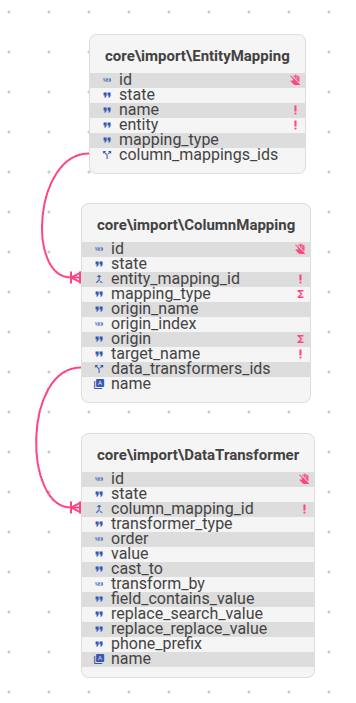
Entity Relationship Diagram (ERD)
The following diagram illustrates the relationships between mappings and transformers in the import process: